Introduction
Remote work has changed the way teams operate. People now work from different cities, time zones, home offices, shared spaces, and sometimes even while travelling. This flexibility has helped businesses hire better talent and keep operations running beyond the boundaries of a physical office.
But it has also created one very practical question for managers:
How do you monitor remote employees without making them feel micromanaged?
This is where many businesses struggle. They want visibility, but they do not want to create pressure. They want accountability, but they do not want to damage trust. They want to know whether work is moving, but they do not want to constantly message employees for updates.
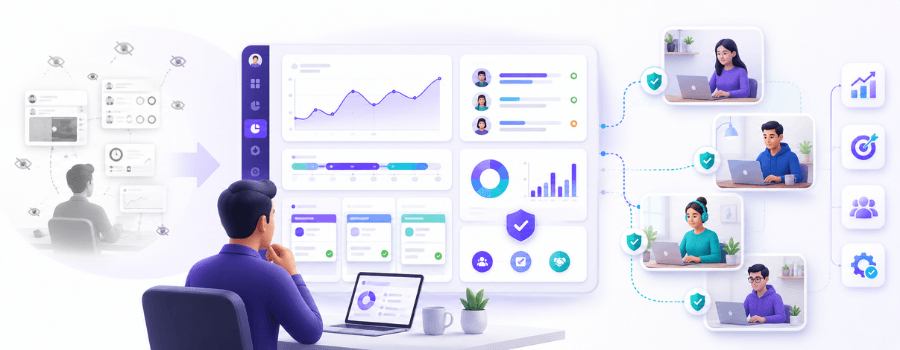
The solution is not to watch people every minute. The solution is to create a clear, transparent, and work-focused system that helps managers understand how work is happening.
Remote employee monitoring, when done properly, is not about control. It is about clarity.
Expert Insight: In our experience of working with growing teams for over 15 years, the biggest remote work challenge is rarely lack of effort. More often, it is lack of visibility. Managers do not always know where work is slowing down, and employees do not always get the clarity they need to stay aligned.
That is why the right approach matters.
In this article, we will discuss how to monitor remote employees in a way that improves productivity, supports accountability, protects trust, and avoids micromanagement.
What Does It Mean to Monitor Remote Employees?
Monitoring remote employees means tracking work-related activity to understand how employees are using their work hours, tools, and systems.
This may include:
- Attendance and login/logout time
- Active and idle time
- Application usage
- Website usage
- Project and task time
- Screenshots, where required
- Live screen monitoring, where necessary
- Productivity trends
- Team-level reports
- Workflow patterns
The purpose is not to track personal behavior. The purpose is to understand work activity.
For example, a manager may want to know whether a remote team is logging in on time, spending enough time on assigned tasks, using the right tools, or facing repeated productivity blockers. Without a system, this information often stays scattered across chats, calls, emails, and manual updates.
Remote employee monitoring software brings this information into one place so managers can make better decisions without depending only on assumptions.
Remote Employee Monitoring vs Micromanagement
This is the most important difference to understand.
Remote employee monitoring is about visibility. Micromanagement is about unnecessary control.
A healthy monitoring system gives managers enough information to guide teams. Micromanagement makes employees feel that every action is being questioned.
| Remote Employee Monitoring | Micromanagement |
|---|---|
| Tracks work patterns | Controls every small action |
| Focuses on productivity visibility | Focuses on constant supervision |
| Uses data to support better decisions | Uses follow-ups to create pressure |
| Reviews trends and outcomes | Checks every minor activity |
| Builds accountability | Creates stress and resistance |
| Supports remote team clarity | Reduces employee trust |
Monitoring tells you whether work is moving in the right direction. Micromanagement interrupts the work itself.
Expert Insight: One common mistake we have seen is that managers start monitoring because they want clarity, but end up micromanaging because they review every small activity too closely. The better approach is to look at patterns, not every click.
For example, if an employee has short idle periods during the day, it does not automatically mean they are not working. They may be on a call, reading a document, planning a task, or working offline. A good manager uses monitoring data as a signal, not as a final judgment.
Why Businesses Need to Monitor Remote Employees
Remote work needs trust, but trust does not mean zero visibility.
When teams work from the same office, managers naturally get some visibility through meetings, conversations, and physical presence. In remote teams, that visibility reduces. Without the right systems, managers may not know who is overloaded, who needs support, where tasks are stuck, or whether work hours are being used effectively.
Here are the main reasons businesses monitor remote employees.
To Improve Work Visibility
Remote managers need to understand how work is happening across teams. This includes work hours, task progress, tool usage, productivity trends, and workload distribution.
Without visibility, small issues can become larger problems. A delayed task may go unnoticed. A team member may be struggling silently. A workflow bottleneck may keep repeating.
Monitoring helps managers identify these patterns early.
To Track Attendance and Work Hours
For many businesses, remote work still requires proper attendance tracking. Employees may work fixed shifts, flexible hours, client support hours, or project-based schedules.
Remote employee time tracking helps businesses monitor:
- Login and logout time
- Total work hours
- Active work hours
- Breaks and idle time
- Late starts
- Early logouts
- Overtime
- Shift adherence
This is especially useful for HR teams, operations teams, BPOs, IT services, customer support teams, and businesses that need accurate attendance records.
To Improve Productivity
Monitoring remote employees helps managers understand productivity patterns.
It can show whether employees are spending time on work-related tools, switching too often between applications, spending too much time on distracting websites, or facing repeated idle periods.
The goal is not to blame employees. The goal is to identify where productivity is getting affected.
Sometimes the issue is not the employee. It may be unclear priorities, too many meetings, poor tools, slow approvals, or workload imbalance.
Good monitoring helps reveal these issues.
To Support Accountability
Remote teams work better when expectations are clear.
When employees know what needs to be done, when it needs to be completed, and how work activity is measured, accountability becomes easier.
Monitoring supports accountability by giving both managers and employees better visibility into work patterns. It reduces the need for constant follow-ups because the data is already available.
To Identify Workflow Bottlenecks
Remote employee monitoring can also help businesses understand where work slows down.
For example:
- Are employees spending too much time waiting for approvals?
- Are teams switching between too many tools?
- Are certain apps slowing productivity?
- Are employees spending more time in meetings than focused work?
- Are project timelines getting delayed because of unclear ownership?
Monitoring data can help answer these questions.
To Protect Business Data
Remote work can create security risks, especially when employees access company systems from different locations and networks.
Monitoring can help identify unusual activity, risky app usage, unauthorized website access, or suspicious behavior. For companies handling sensitive data, this visibility can be important for compliance and internal security.
What Should You Track When Monitoring Remote Employees?
A good remote monitoring system should track work-related data that helps improve productivity, accountability, and operations.
Here are the most useful metrics:
| Metric | Why It Matters |
|---|---|
| Attendance | Helps track presence, shifts, and punctuality. |
| Active Time | Shows actual work engagement during working hours. |
| Idle Time | Helps identify inactivity, blockers, or workload gaps. |
| App Usage | Shows which tools employees use during work. |
| Website Usage | Helps identify productive and distracting websites. |
| Project Time | Tracks time spent on tasks, clients, and projects. |
| Screenshots | Provides visual work context when required. |
| Productivity Trends | Helps managers understand work patterns over time. |
| Overtime | Helps detect overwork or workload imbalance. |
The key is to track what helps the business improve work visibility. Do not track data just because a tool allows you to track it.
More data does not always mean better management. Relevant data matters more.
What You Should Not Track Unnecessarily
This part is just as important as knowing what to track.
Responsible remote employee monitoring should not cross into unnecessary personal tracking. Businesses should avoid monitoring areas that do not have a clear work-related purpose.
Avoid tracking:
- Personal browsing outside work hours
- Private messages
- Personal device activity
- Webcam activity unless legally or operationally justified
- Continuous screen watching without a clear need
- Personal location for non-field roles
- Keystrokes as the only productivity measure
- Any activity unrelated to work performance, security, or compliance
When monitoring becomes excessive, employees stop seeing it as a productivity system and start seeing it as surveillance. That is where trust begins to break.
A good rule is simple: track what helps work improve, not what makes employees feel watched.
How to Monitor Remote Employees Without Micromanaging
Now let us get into the practical part.
Monitoring remote employees without micromanaging requires the right mix of expectations, tools, communication, and management habits.
1. Set Clear Expectations First
Before using any monitoring tool, define what good work looks like.
Employees should know:
- What their working hours are
- What deliverables are expected
- Which tools they should use
- How task progress will be reviewed
- What response time is expected
- How attendance will be tracked
- How productivity will be measured
- What data will be monitored
Many remote team issues happen because expectations are unclear. Monitoring software can show activity, but it cannot fix unclear goals by itself.
Start with clarity.
2. Focus on Outcomes, Not Just Activity
Activity matters, but outcomes matter more.
An employee can be active all day and still not move important work forward. Another employee may have lower activity during a certain period but may still deliver high-quality work on time.
That is why managers should not judge productivity only by mouse movement, keyboard activity, or total online hours.
Track outcomes such as:
- Task completion
- Project progress
- Quality of work
- Deadline adherence
- Client deliverables
- Team contribution
- Problem resolution
Use activity data as supporting context, not the full story.
3. Use Transparent Employee Monitoring Software
Employees should know that monitoring is being used.
Be clear about:
- What is being tracked
- Why it is being tracked
- When monitoring is active
- Who can access the reports
- How the data will be used
- What will not be monitored
Transparency reduces resistance. Most employees are more comfortable with monitoring when they understand that it is work-focused and not personal.
Hidden monitoring may give short-term visibility, but it can damage long-term trust.
4. Track Work Patterns, Not Every Click
Managers should avoid obsessing over every small movement.
Instead of checking every screenshot or every minute of activity, look for patterns:
- Is idle time increasing regularly?
- Are certain apps taking too much time?
- Are employees frequently working overtime?
- Are tasks taking longer than expected?
- Are certain teams consistently overloaded?
- Are there repeated distractions during focus hours?
Patterns help managers make better decisions. Every click does not.
5. Review Data in Context
Monitoring data needs context.
A low-activity period does not always mean someone was not working. A sudden drop in app usage does not automatically mean productivity is down. Screenshots may not always show the full picture of what someone is doing.
Real-Life Example: An employee may show low keyboard or mouse activity during a certain period, but that time may have been spent on client calls, strategy discussions, research, or offline planning. This is why monitoring data should always be reviewed with work context before making any judgment.
Managers should ask better questions before reaching conclusions:
- Was the employee in a meeting?
- Was the task research-heavy?
- Was the person working offline?
- Was there a technical issue?
- Was the workload clearly assigned?
- Was the employee waiting for input from someone else?
Good managers use data to understand, not just to inspect.
6. Use Data to Support, Not Punish
Monitoring should help managers support employees.
For example, if data shows repeated overtime, the manager should check whether the employee is overloaded. If app usage shows too many tool switches, the manager should review whether the workflow is too fragmented. If idle time is high across a team, the issue may be poor task planning or unclear priorities.
Monitoring data should help businesses:
- Solve blockers
- Balance workloads
- Improve planning
- Reduce distractions
- Support training
- Improve tool usage
- Identify process gaps
When data is used only for punishment, employees will naturally resist it.
7. Maintain a Healthy Communication Cadence
Remote employees do not need constant check-ins. They need predictable communication.
Instead of messaging employees every hour, use a structured communication rhythm:
- Daily or weekly task updates
- Weekly one-on-one meetings
- Project dashboards
- Team check-ins
- Clear reporting formats
- Monthly performance reviews
This reduces interruptions and gives employees space to work.
Monitoring software should reduce unnecessary follow-ups, not increase them.
8. Give Employees Visibility Into Their Own Productivity
A strong monitoring culture is not one-sided.
Employees should also be able to understand their own productivity patterns. When employees can see their active time, idle time, app usage, and task time, they can self-correct and manage their day better.
This turns monitoring into a productivity tool, not just a management tool.
9. Create a Remote Monitoring Policy
Every company using remote employee monitoring software should have a clear policy.
The policy should explain:
- What data will be tracked
- Why the data is being tracked
- When monitoring will be active
- Whether screenshots will be captured
- Who can access reports
- How long data will be stored
- How the data will be used
- What activity will not be tracked
- How employees can raise concerns
A written policy protects both the company and employees.
10. Choose a Tool That Supports Ethical Monitoring
The right tool should give visibility without forcing excessive supervision.
Look for features such as:
- Time tracking
- Attendance monitoring
- Active and idle time tracking
- App and website usage tracking
- Screenshot controls
- Live screen monitoring options
- Project and task time tracking
- Productivity reports
- Role-based access
- Privacy controls
- Team-level analytics
A good tool should help managers understand work without creating unnecessary pressure.
Best Practices for Ethical Remote Employee Monitoring
Ethical monitoring is about balance.
Here are some best practices to follow:
- Inform employees before monitoring begins
- Track only work-related activity
- Avoid after-hours monitoring
- Use role-based access
- Limit access to sensitive reports
- Avoid excessive screenshot frequency
- Use screenshots only where visual context is needed
- Review productivity data in context
- Protect employee data securely
- Create clear internal policies
- Use insights to improve workflows
- Avoid using data only for disciplinary action
- Review team-level trends, not only individual behavior
Remote employee monitoring should help people work better. It should not make them feel watched all day.
Remote Employee Monitoring Methods
There are different ways to monitor remote employees. The right method depends on your business model, team size, industry, and work style.
Time Tracking
Time tracking helps businesses record working hours, active time, idle time, breaks, and overtime.
It is useful for teams that need accurate timesheets, payroll data, attendance records, or client billing.
Attendance Monitoring
Attendance monitoring helps track when employees start and end their workday.
This is important for shift-based teams, support teams, BPOs, remote operations, and businesses where punctuality matters.
App and Website Usage Tracking
Application and website tracking shows which tools and websites employees use during work hours.
This helps managers understand whether time is being spent on productive platforms, communication tools, project systems, research websites, or distracting sites.
Screenshot Monitoring
Screenshot monitoring captures screen images at defined intervals.
This can help provide work context, especially for remote teams, operations teams, support teams, and project-based teams. However, screenshot monitoring should always be transparent and configurable.
Live Screen Monitoring
Live screen monitoring allows managers to view employee screens in real time when required.
This feature should be used carefully and only for valid business purposes such as process verification, training, support operations, or critical workflow visibility.
Project and Task Time Tracking
Project and task time tracking helps teams understand how much time is spent on specific tasks, clients, or projects.
This is useful for IT services, agencies, consulting firms, and businesses managing multiple client deliverables.
Productivity Analytics
Productivity analytics helps managers understand team performance through reports and trends.
It can show active time, idle time, app usage, website usage, focus patterns, and productivity changes over time.
This helps managers move from guessing to informed decision-making.
How to Choose the Right Remote Employee Monitoring Software
Choosing the right remote employee monitoring software is important because the wrong tool can create more confusion than clarity.
Here are the main things to evaluate.
Easy Time Tracking
The tool should automatically track work hours, active time, idle time, breaks, and attendance without requiring too much manual input.
App and Website Visibility
Managers should be able to understand which applications and websites are being used during work hours.
This helps identify productive tools, distractions, and workflow patterns.
Privacy Controls
The software should support role-based access, configurable tracking, and clear reporting controls.
Not every manager needs access to every report. Data visibility should be structured.
Screenshot and Screen Monitoring Options
Screenshots and live screen monitoring should be flexible. Businesses should be able to decide when these features are needed and how they should be used.
Project and Task Tracking
For teams working on client projects or internal deliverables, project and task time tracking is very useful.
It helps managers understand where time is going and how work is progressing.
Reports and Dashboards
The software should convert raw data into useful reports.
Good dashboards help managers quickly understand productivity trends, attendance, app usage, idle time, and team performance.
Remote and Hybrid Team Support
The tool should work well for distributed teams across locations, shifts, departments, and work models.
Easy Setup and Support
The platform should be easy for admins, managers, and employees to use.
A tool may have many features, but if people cannot adopt it easily, it will not create real value.
Common Mistakes to Avoid While Monitoring Remote Employees
Even with the right tools, remote monitoring can fail if it is introduced poorly.
Expert Insight: After working with teams across different industries, one thing is clear: monitoring fails when it is introduced as control. It works better when it is introduced as a system for clarity, accountability, and support.
Here are the common mistakes to avoid:
1. Monitoring Without Informing Employees
Hidden monitoring damages trust. Employees should know what is being tracked and why.
2. Tracking Too Many Metrics
Do not track everything just because the software allows it. Focus on the metrics that actually help improve work visibility.
3. Judging Productivity Only by Hours
Long hours do not always mean high productivity. Look at output, quality, deadlines, and work patterns.
4. Using Screenshots as the Only Proof of Work
Screenshots can provide context, but they should not be the only measure of productivity.
5. Ignoring Project Outcomes
Activity data should be connected with actual work results. A team may look busy but still miss deadlines.
6. Constantly Messaging Employees for Updates
Too many check-ins can become micromanagement. Use dashboards and scheduled updates instead.
7. Not Creating a Monitoring Policy
A clear policy helps avoid confusion, resistance, and misuse of data.
8. Giving Too Many People Access to Reports
Employee activity data should be accessed only by authorized people.
9. Ignoring Burnout Signals
High activity and long work hours may look productive, but they can also indicate overload.
10. Using Monitoring Data Only for Discipline
Monitoring should help improve systems, support people, and guide better decisions. It should not be used only to question employees.
How Mera Work Helps Monitor Remote Employees Without Micromanaging
Mera Work helps businesses monitor remote employees with structured work visibility instead of constant supervision.
Managers can track important work-related data from one platform, including:
- Time tracking
- Attendance monitoring
- Active and idle time
- App usage
- Website usage
- Screenshot monitoring
- Live screen monitoring
- Project and task time
- Productivity analytics
- Workforce reports
This helps managers understand how work is happening across remote and hybrid teams without depending on repeated follow-ups or assumptions.
Mera Work supports a visibility-first approach. The platform helps businesses see work patterns, identify productivity gaps, improve accountability, and manage distributed teams more effectively.
The goal is not to micromanage employees. The goal is to give managers the clarity they need to support teams better.
With Mera Work, businesses can:
- Improve remote team visibility
- Track attendance and work hours accurately
- Understand app and website usage
- Review productivity trends
- Identify idle time and workflow gaps
- Track project and task time
- Support role-based workforce reporting
- Reduce unnecessary manual follow-ups
For growing remote teams, this kind of visibility can make management more structured, transparent, and practical.
Sample Remote Employee Monitoring Policy Checklist
Before implementing remote employee monitoring software, create a simple policy that answers these questions:
- What data will be tracked?
- Why is this data being tracked?
- When will monitoring be active?
- Will screenshots be captured?
- Will live screen monitoring be used?
- Who can access employee reports?
- How will the data be reviewed?
- How long will the data be stored?
- What activity will not be monitored?
- How will employees be informed?
- How can employees raise concerns?
- How will the company protect employee data?
This checklist helps businesses introduce monitoring in a transparent and responsible way.
Final Thoughts
Learning how to monitor remote employees without micromanaging is one of the most important management skills for modern businesses.
Remote teams need trust, but they also need clarity. Managers need visibility, but they do not need to control every small action.
The right approach is to combine clear expectations, transparent communication, ethical monitoring practices, and reliable remote employee monitoring software.
When done well, monitoring helps everyone. Managers get better visibility. Employees get clearer expectations. Teams become more accountable. Businesses can make better decisions based on real work data.
Remote employee monitoring should never feel like surveillance. It should feel like a system that helps work move better.
With tools like Mera Work, businesses can track time, attendance, productivity, app usage, screenshots, live screen activity, and project progress in a structured way. This helps remote and hybrid teams stay aligned without unnecessary micromanagement.
FAQs
How do you monitor remote employees without micromanaging?
You can monitor remote employees without micromanaging by setting clear expectations, tracking work-related metrics, using transparent employee monitoring software, focusing on outcomes, and reviewing productivity data in context.
What is the best way to monitor remote employees?
The best way to monitor remote employees is to combine time tracking, attendance monitoring, app and website usage tracking, project progress tracking, and productivity analytics with clear communication and employee transparency.
Is it legal to monitor remote employees?
Employee monitoring is generally allowed when businesses follow applicable laws, inform employees, track work-related activity, and use the data for legitimate business purposes. Companies should always review local privacy and labor laws before implementation.
What should companies track for remote employees?
Companies can track attendance, work hours, active time, idle time, app usage, website usage, project time, task progress, screenshots, and productivity trends, depending on their business needs and internal policy.
Does employee monitoring reduce trust?
Employee monitoring can reduce trust if it is hidden, excessive, or used only for control. Transparent and work-focused monitoring can improve clarity, accountability, and team alignment.
How can managers track productivity without watching employees constantly?
Managers can track productivity through task completion, project progress, attendance reports, active time, app usage trends, and team-level productivity analytics instead of constantly watching employees.
Should remote employees know they are being monitored?
Yes. Employees should clearly know what is being monitored, why it is being monitored, when monitoring is active, who can access reports, and how the data will be used.
Can screenshots be used ethically for remote employee monitoring?
Yes, screenshots can be used ethically when employees are informed, screenshot frequency is reasonable, access is limited, and screenshots are used only for work-related visibility.
What is the difference between remote employee monitoring and micromanagement?
Remote employee monitoring provides work visibility through data and reports. Micromanagement involves excessive control, constant interruptions, and checking every small action.
How does Mera Work help monitor remote employees?
Mera Work helps businesses track remote employee time, attendance, active and idle time, app and website usage, screenshots, live screen activity, project and task time, and productivity trends from one platform.