Introduction
The way businesses manage work has changed significantly in recent years. Remote teams, hybrid work models, digital collaboration tools, and distributed operations have made it harder for organizations to rely only on traditional supervision methods.
Today, leaders need clearer visibility into how work happens across teams, projects, tools, and locations. This is where employee monitoring software plays an important role.
Employee monitoring software helps organizations track and analyze work-related activity such as attendance, active time, idle time, application usage, website activity, task progress, and productivity trends. Instead of depending on assumptions, managers can use real-time data and reports to understand how teams are working and where improvements are needed.
However, modern employee monitoring is not about constant surveillance. The real value lies in improving work visibility, strengthening accountability, supporting productivity, and helping businesses manage remote, hybrid, and office-based teams more effectively.
In this guide, we will explain what employee monitoring software is, how it works, its main features, key benefits, ethical concerns, common use cases, and how to choose the right solution for your business.
What is Employee Monitoring Software?
Employee monitoring software is a digital tool that helps organizations track, record, and analyze employee work activity during working hours. It collects work-related data from company devices, applications, websites, and productivity systems, then turns that data into reports and insights for managers, HR teams, and business leaders.
In simple terms, employee monitoring software helps businesses understand:
- When employees are working
- How working hours are being used
- Which applications and websites are being accessed
- How much time is spent actively working
- Where idle time or workflow gaps may exist
- How teams are performing across tasks and projects
Modern employee monitoring tools are often automated and run in the background during work hours. They help organizations create better visibility without requiring manual reporting or constant follow-ups.
Unlike traditional supervision, today’s workforce monitoring software focuses more on work clarity, productivity insights, operational transparency, and smarter decision-making.
Traditional Monitoring vs Modern Employee Monitoring
| Traditional Monitoring | Modern Employee Monitoring |
|---|---|
| Manual supervision | Automated activity tracking |
| Paper-based attendance | Digital attendance reports |
| Limited visibility | Real-time workforce insights |
| Office-dependent management | Remote and hybrid team visibility |
| Manager assumptions | Data-backed productivity analysis |
| Reactive follow-ups | Proactive workflow improvement |
How Does Employee Monitoring Software Work?
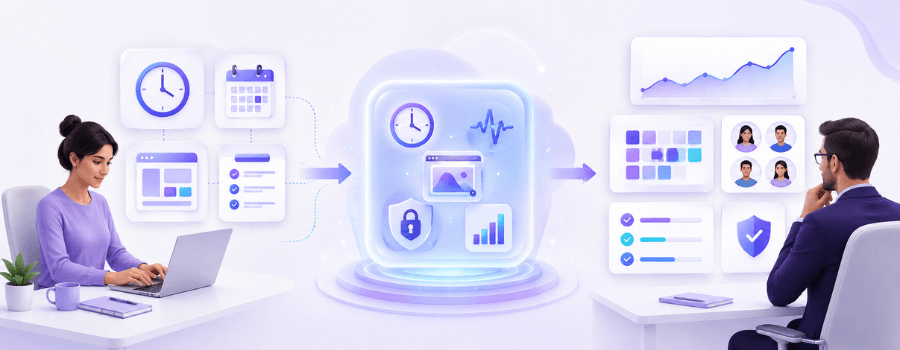
Employee monitoring software works by collecting work activity data from employee systems, workplace tools, and connected platforms. This data is then organized into dashboards, reports, and analytics that help businesses understand productivity, attendance, and workflow patterns.
The process usually includes four main steps:
1. Data Collection
The software collects work-related information such as login and logout time, active hours, idle time, application usage, website usage, screenshots, task time, and attendance records.
For remote and hybrid teams, this helps managers see work activity even when employees are not physically present in the office.
2. Activity Tracking
Once the software is active, it tracks employee activity during working hours. Depending on the tool and company policy, this may include time tracking, app usage tracking, website tracking, screen monitoring, or project-based time logs.
The goal is not to monitor personal behavior, but to understand work patterns and identify productivity gaps.
3. Productivity Analysis
Employee productivity monitoring software analyzes the collected data and organizes it into meaningful categories such as productive time, unproductive time, idle time, focus time, or neutral activity.
Managers can then review team productivity trends, individual work patterns, and department-level performance through visual dashboards.
4. Reporting and Insights
The system generates reports such as attendance summaries, productivity reports, app and website usage reports, idle time reports, project time reports, and employee activity logs.
These insights help organizations improve planning, reduce workflow delays, manage workloads better, and make more informed operational decisions.
Key Metrics Tracked by Employee Monitoring Software
| Metric | What It Helps Businesses Understand |
|---|---|
| Active Time | How much time employees spend actively working |
| Idle Time | Periods of inactivity during working hours |
| Attendance | Login, logout, shift presence, and punctuality |
| App Usage | Which applications are used during work hours |
| Website Usage | Work-related and non-work-related web activity |
| Productivity Trends | Team and individual work patterns over time |
| Project Time | Time spent on specific projects or tasks |
| Screen Activity | Visual work context through screenshots or live monitoring |
Main Features of Employee Monitoring Software
The best employee monitoring software usually combines time tracking, activity monitoring, productivity analytics, reporting, and visibility controls in one platform.
Here are the most important features businesses should look for:
1. Time Tracking
Time tracking helps organizations automatically record working hours, active time, idle time, break time, overtime, and shift attendance.
This feature is especially useful for businesses that manage remote teams, hybrid teams, client billing, project delivery, or shift-based employees. It reduces manual effort and gives managers a clearer view of how time is being used across the organization.
2. Attendance Monitoring
Attendance monitoring helps businesses track when employees start and end their workday. It can also help HR and operations teams manage late logins, early logouts, absences, and shift compliance.
Instead of relying on manual attendance records, companies can use digital attendance reports to improve accuracy and reduce administrative workload.
3. Application and Website Usage Tracking
Application and website tracking shows which apps and websites employees use during working hours.
This helps managers understand whether time is being spent on productive tools, communication platforms, project systems, research websites, or distracting platforms. Over time, these insights can help businesses improve focus, identify workflow bottlenecks, and optimize tool usage.
4. Screen Monitoring
Screen monitoring gives managers better visibility into employee screen activity during work hours. Depending on the software and company policy, this may include live screen monitoring, periodic screenshots, or screenshot history.
This feature can be useful for remote teams, support teams, BPOs, IT teams, and businesses where work verification and process visibility are important.
However, screen monitoring should always be used responsibly, with clear policies and employee awareness.
5. Screenshot Monitoring
Screenshot monitoring captures screenshots at defined intervals to give managers visual context of work activity.
It helps businesses validate work progress, review task activity, and maintain accountability, especially for distributed teams. Some modern tools also offer blurred screenshots or privacy-focused controls to balance visibility with employee comfort.
6. Productivity Analytics
Productivity analytics helps organizations understand work patterns through reports, dashboards, and trend analysis.
Instead of only tracking hours, productivity analytics shows how effectively time is being used. It can help managers identify high-focus periods, recurring distractions, workload imbalance, idle time trends, and process inefficiencies.
7. Project and Task Time Tracking
Project and task time tracking allows employees to log time against specific projects, clients, tasks, or work categories.
This is useful for businesses that need better visibility into project costs, resource allocation, delivery timelines, and team workload. It also supports more accurate client billing and project planning.
8. Workforce Analytics
Workforce analytics gives leadership a broader view of team performance, productivity trends, attendance behavior, workload distribution, and operational efficiency.
It helps businesses move from scattered employee data to structured insights that support better planning and decision-making.
9. Data Security Monitoring
Some employee monitoring tools also help organizations identify risky user activity, unusual work patterns, unauthorized access attempts, or suspicious file movements.
This can support internal security, compliance, and data protection, especially in industries that handle sensitive client, financial, or operational information.
Benefits of Employee Monitoring Software
When implemented ethically, employee monitoring software can create value for both businesses and employees. It gives organizations better visibility while helping teams work with clearer expectations.
1. Improves Workforce Productivity
Employee monitoring software helps businesses identify where time is being used effectively and where productivity may be getting affected.
Managers can detect repeated idle time, excessive distractions, workflow gaps, and delayed work patterns. With the right insights, they can guide teams better instead of relying on assumptions.
2. Strengthens Accountability
Clear work visibility helps employees and managers stay aligned on expectations.
When work hours, activity, and task progress are visible, teams become more accountable without needing constant follow-ups. This is especially useful for remote and hybrid teams where direct supervision is limited.
3. Supports Remote and Hybrid Team Management
Remote employee monitoring software helps businesses manage distributed teams more effectively.
Managers can review attendance, active time, app usage, project time, and productivity trends without needing employees to be physically present in the office. This helps maintain operational clarity across locations and time zones.
4. Improves Time Management
Time tracking and productivity reports help businesses understand how work hours are being spent.
This can reveal unnecessary delays, repeated interruptions, excessive idle time, or inefficient workflows. Over time, companies can use these insights to improve schedules, workloads, and project timelines.
5. Helps Identify Workflow Bottlenecks
Employee monitoring tools do not only show what employees are doing. They also help reveal where work slows down.
For example, if employees spend too much time switching between tools, waiting for approvals, or using non-essential platforms, managers can take action to simplify workflows.
6. Improves Payroll and Attendance Accuracy
Automated attendance and time tracking can reduce dependency on manual records.
HR and operations teams can use accurate time data to review attendance, overtime, shifts, and work-hour compliance more efficiently.
7. Supports Better Resource Planning
With visibility into workload, active time, project time, and productivity trends, managers can make better decisions about staffing and resource allocation.
This helps businesses understand which teams are overloaded, which projects need support, and where capacity is available.
8. Encourages Data-Backed Decisions
Employee monitoring software gives leaders access to structured workforce data.
Instead of making decisions based on assumptions, managers can use reports and analytics to improve productivity, team performance, project planning, and operational efficiency.
Ethical Concerns in Employee Monitoring
Employee monitoring software can be highly useful, but it must be implemented carefully. If used without transparency, it can create privacy concerns, employee discomfort, and trust issues.
The goal should be to improve work visibility, not to create unnecessary pressure.
Common Ethical Concerns
Employee Privacy
Employees may feel uncomfortable if they believe they are being watched constantly. Businesses should clearly define what is being monitored, why it is being monitored, and how the data will be used.
Monitoring should focus on work-related activity, not personal behavior.
Workplace Trust
Hidden monitoring can damage trust between employees and management. Transparent communication is essential before introducing any employee tracking software.
Employees should know the purpose of monitoring and how it supports productivity, accountability, and operational improvement.
Data Security
Employee activity data should be stored securely and accessed only by authorized people. Businesses should use role-based access, clear permissions, and secure data handling practices.
Legal and Policy Compliance
Organizations should review applicable workplace laws, privacy rules, and internal HR policies before implementing employee monitoring software.
Monitoring policies should be documented, communicated, and aligned with local regulations.
Ethical Monitoring vs Over-Surveillance
| Ethical Monitoring | Over-Surveillance |
|---|---|
| Transparent policies | Hidden tracking |
| Work-focused visibility | Personal behavior tracking |
| Employee awareness | No disclosure |
| Productivity improvement | Excessive control |
| Role-based access | Open access to sensitive data |
| Clear business purpose | Unclear or unnecessary monitoring |
Best Practices for Ethical Employee Monitoring
To implement employee monitoring software responsibly, businesses should follow these best practices:
- Inform employees before monitoring begins
- Explain what data will be tracked and why
- Focus on work-related activity only
- Avoid unnecessary or excessive tracking
- Use role-based access for managers and HR teams
- Review monitoring reports in context
- Use insights to support teams, not only to question them
- Create a clear employee monitoring policy
- Balance productivity visibility with employee privacy
When monitoring is transparent and purpose-driven, it becomes easier for employees to accept it as a productivity and accountability tool.
Types of Employee Monitoring Software
Different businesses use different types of employee monitoring tools based on their goals, team structure, and industry needs.
1. Time Tracking Software
Time tracking software focuses on recording work hours, active time, idle time, breaks, attendance, overtime, and shift activity.
It is useful for companies that need better visibility into daily working hours and time utilization.
2. Productivity Monitoring Software
Productivity monitoring software helps businesses understand how effectively employees use their working hours.
It may include productivity scores, app and website categorization, activity levels, idle time analysis, and performance dashboards.
3. Screen Monitoring Software
Screen monitoring software provides visibility into employee screen activity through live screen monitoring, screenshots, or screen history.
It is often used by remote teams, BPOs, support teams, and operations teams where visual work verification is important.
4. Application and Website Monitoring Software
This type of software tracks which applications and websites employees use during work hours.
It helps managers identify productive tools, distracting websites, unnecessary software usage, and workflow inefficiencies.
5. Project Time Tracking Software
Project time tracking software helps employees and managers track time spent on specific tasks, projects, clients, or work categories.
It is valuable for IT companies, agencies, consulting firms, and service-based businesses.
6. Workforce Analytics Platforms
Workforce analytics platforms combine multiple data points such as attendance, productivity, app usage, project time, and work trends into centralized dashboards.
These platforms help leadership make better decisions about productivity, resource planning, and operational performance.
Who Uses Employee Monitoring Software?
Employee monitoring software is used by organizations that need better visibility into work activity, productivity, attendance, and team performance.
Common users include:
- IT and software companies
- BPOs and call centers
- Remote-first businesses
- Hybrid teams
- Healthcare organizations
- Financial service companies
- Logistics companies
- Professional service firms
- Agencies and consulting companies
- Operations-heavy businesses
These organizations use employee monitoring tools to improve accountability, manage distributed teams, track work hours, support compliance, and improve operational efficiency.
How to Choose the Right Employee Monitoring Software
Choosing the right employee monitoring software depends on your business goals, team structure, monitoring needs, and privacy expectations.
Here are the key factors to consider:
1. Define Your Monitoring Goals
Before choosing a tool, identify what you want to improve.
Are you trying to track attendance? Improve productivity? Manage remote employees? Monitor app and website usage? Track project time? Improve workflow visibility?
Clear goals will help you select the right features.
2. Look for Easy-to-Understand Reports
A good employee monitoring tool should provide clear dashboards and reports.
Managers should be able to understand productivity trends, attendance data, active time, idle time, and app usage without needing complicated manual analysis.
3. Check Privacy and Access Controls
Choose software that supports ethical monitoring through role-based access, privacy settings, clear data visibility, and controlled reporting.
This helps ensure that only authorized users can view employee activity data.
4. Review Time Tracking and Productivity Features
Look for features such as automatic time tracking, active and idle time, attendance reports, project time tracking, productivity analytics, app usage tracking, and website monitoring.
These features help businesses get a complete view of work activity.
5. Consider Remote and Hybrid Team Support
If your team works remotely or in a hybrid model, choose software that works across distributed environments.
The tool should help managers view work activity, attendance, productivity, and task progress without depending on physical supervision.
6. Evaluate Ease of Setup
A good employee monitoring platform should be easy to deploy, easy to use, and simple for managers to adopt.
Complicated tools can reduce adoption and make reporting difficult.
7. Choose a Scalable Platform
Your monitoring needs may grow as your team expands. Choose a solution that can support more users, departments, roles, and reporting needs over time.
8. Check Support and Onboarding
Strong support is important, especially when implementing employee monitoring software for the first time.
Look for a provider that can help with setup, onboarding, training, and ongoing support.
How Mera Work Helps Businesses Monitor Work Without Micromanaging
Mera Work is built to help businesses improve workforce visibility while keeping monitoring structured, transparent, and work-focused.
With Mera Work, organizations can track time, attendance, active hours, idle time, app and website usage, screenshots, live screen activity, project time, and productivity trends from one platform.
The goal is not to create pressure through excessive supervision. The goal is to help managers understand how work is happening, identify workflow gaps, support accountability, and make better decisions with reliable workforce data.
Mera Work helps businesses:
- Track employee time and attendance
- Monitor active and idle time
- Understand app and website usage
- Review productivity trends
- Track project and task time
- Improve remote and hybrid team visibility
- Use workforce analytics for better decision-making
- Support ethical and transparent employee monitoring
For growing teams, Mera Work provides the visibility needed to manage productivity without depending on assumptions or constant follow-ups.
Future Trends in Employee Monitoring Software
Employee monitoring software is evolving from simple tracking tools into intelligent workforce visibility platforms.
Here are some trends shaping the future:
1. Privacy-First Monitoring
Businesses are becoming more aware of employee privacy and workplace trust. Future monitoring systems will focus more on transparency, role-based visibility, and privacy-conscious controls.
2. AI-Based Productivity Insights
AI and analytics will continue to play a larger role in identifying productivity trends, workflow gaps, workload imbalance, and unusual work patterns.
3. Integrated Workforce Management
Companies are moving toward all-in-one platforms that combine time tracking, productivity monitoring, project tracking, attendance, reporting, and workforce analytics in one place.
4. Better Remote Work Visibility
As remote and hybrid work continue to grow, businesses will need smarter tools to manage distributed teams without creating unnecessary supervision pressure.
5. Focus on Employee Well-Being
Modern monitoring tools may increasingly help businesses identify signs of overwork, long working hours, irregular schedules, and workload imbalance.
This can help managers support employee well-being along with productivity.
Conclusion
Employee monitoring software has become an important tool for modern businesses that want better visibility into work activity, productivity, attendance, and team performance.
When used correctly, it helps organizations improve time management, strengthen accountability, manage remote and hybrid teams, reduce workflow inefficiencies, and make better operational decisions.
However, employee monitoring should always be implemented with transparency and responsibility. Businesses should clearly communicate monitoring policies, respect employee privacy, and focus on work-related insights rather than personal behavior.
The future of employee monitoring is not about surveillance. It is about building a more transparent, productive, and well-managed workplace.
With a solution like Mera Work, businesses can improve workforce visibility, track productivity, and manage teams more effectively without micromanaging.
FAQ
What is employee monitoring software in simple words?
Employee monitoring software is a tool that helps businesses track work-related employee activity such as working hours, attendance, app usage, website usage, idle time, screenshots, and productivity trends.
Is employee monitoring software legal?
Employee monitoring software is generally allowed when businesses follow applicable workplace laws, inform employees, use the data for legitimate business purposes, and respect privacy requirements. Companies should always review local laws and create a clear monitoring policy before implementation.
What can employee monitoring software track?
Employee monitoring software can track working hours, attendance, active time, idle time, app usage, website usage, screenshots, screen activity, project time, task progress, and productivity reports, depending on the features enabled.
Does employee monitoring software help productivity?
Yes, when used ethically, employee monitoring software can help improve productivity by identifying workflow gaps, reducing distractions, improving accountability, and giving managers better visibility into how work time is used.
Is employee monitoring software suitable for remote teams?
Yes. Employee monitoring software is especially useful for remote and hybrid teams because it helps managers track attendance, work activity, productivity, and task progress without requiring physical supervision.
What is the difference between employee monitoring and micromanagement?
Employee monitoring focuses on work visibility, productivity insights, and accountability. Micromanagement focuses on excessive control and constant supervision. Ethical monitoring should help teams work better without creating unnecessary pressure.
How can companies monitor employees ethically?
Companies can monitor employees ethically by being transparent, informing employees, tracking only work-related activity, using role-based access, protecting employee data, and using insights to improve workflows rather than create pressure.
What features should I look for in employee monitoring software?
Important features include time tracking, attendance monitoring, active and idle time tracking, app and website usage tracking, screenshot monitoring, live screen monitoring, project time tracking, productivity analytics, and workforce reports.
Who uses employee monitoring software?
Employee monitoring software is commonly used by IT companies, BPOs, call centers, remote teams, hybrid teams, healthcare companies, finance teams, logistics businesses, agencies, and service-based organizations.
How does Mera Work support employee monitoring?
Mera Work helps businesses track time, attendance, active and idle time, app and website usage, screenshots, live screen activity, project time, and productivity trends through structured workforce visibility and analytics.